Oracle Enterprise Data Management Cloud: Where AI Readiness Actually Starts

If you’ve been working in Oracle Cloud for any length of time, you’ll know that data governance quality determines the quality of everything downstream. Reports, forecasts, consolidations, AI outputs: they’re all only as good as the master data behind them. Following the EDM London Spotlight I attended, here’s where the product stands and where it’s heading.

What EDM is (and isn’t)

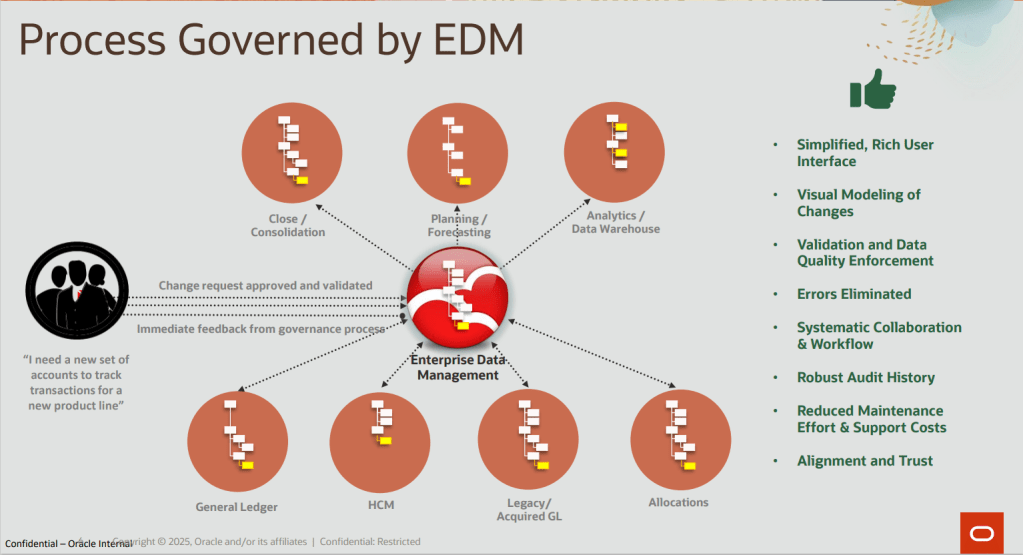
The naming matters. EDM is “Enterprise Data” Management, not Enterprise “Data Management.” It’s not a database tool or storage layer. It’s a governed system of reference for managing the data that describes your enterprise: hierarchies, dimensions, master data, reference data, data maps, taxonomies, reporting structures.

The problem it solves is one most Oracle customers will recognise. Without EDM, a chart of accounts change request starts with an email to IT, fans out to half a dozen application admins, and ends somewhere between a hierarchy mismatch in Planning and a data kickout in Financial Consolidation and Close (FCC). No audit trail, no systematic workflow, no single point of control. EDM replaces that with a governed, collaborative process where changes are requested, validated, approved, and propagated in a controlled sequence.
EDM versus Oracle DRM

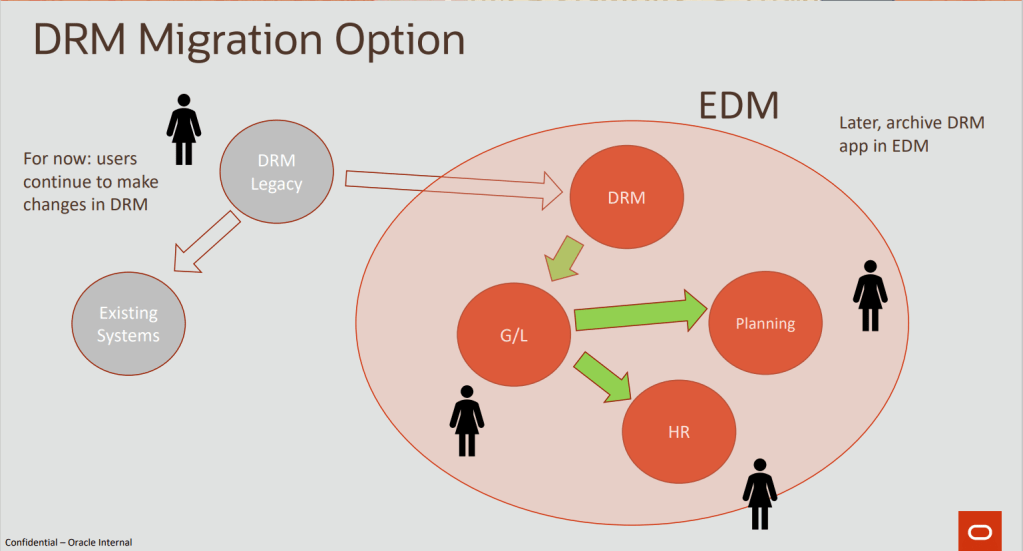
DRM was built for waterfall implementation: gather requirements, build the model, deliver, train, repeat. EDM is designed for an agile, incremental approach. Turn it on, start using it, add rules and policies as they become evident. The traditional MDM big-bang approach has a well-documented failure rate, and EDM’s application-centric model sidesteps it. You start with one application, demonstrate value, and grow from there. New applications are onboarded incrementally without disrupting what’s already in place. For organisations still on DRM, the migration path is practical: users continue in DRM while it’s registered inside EDM as an application, and the legacy system is archived once the transition is complete.
Implementation design patterns

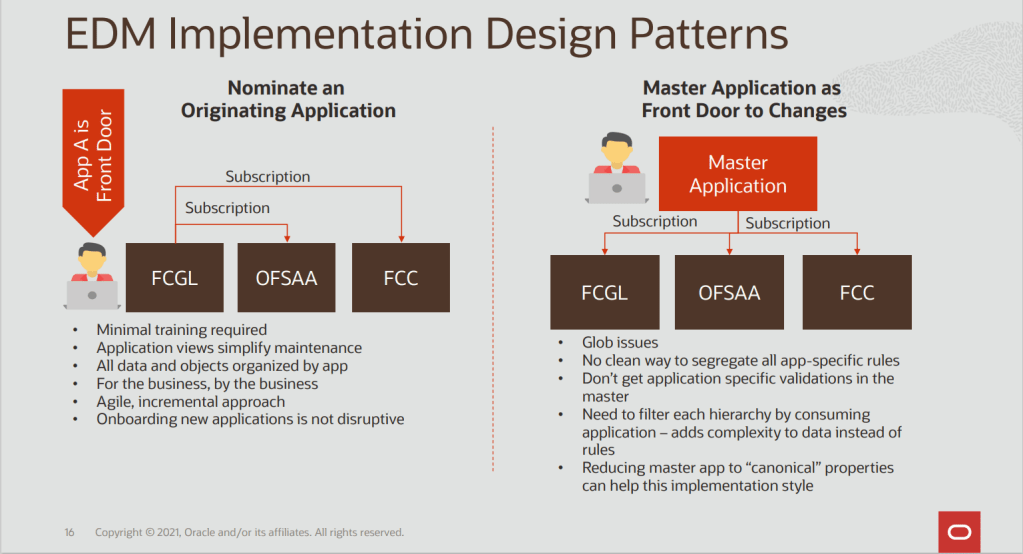
The London session was clear on which pattern works best. Nominate an originating application rather than using a master application as the front door to all changes. The originating application pattern keeps data, objects, and validations scoped to the application that owns them. Downstream applications subscribe to changes. This avoids the problem where a single undifferentiated data model makes it impossible to isolate which rules belong to which application. The master application pattern can work if you reduce it to canonical properties only, but it adds complexity and makes onboarding new applications more disruptive.
EDM and AI

Oracle’s AI approach in EDM operates at two levels.

Internal assistants work within EDM’s existing request and approval model. The Registration Assistant (25.12) generates application metadata and configuration artefacts from a sample data file, accelerating new application setup considerably. The Conversational Request Assistant lets users query master data in natural language, ask questions about existing requests, and generate bulk update actions, all within normal governance controls. Future internal assistants on the roadmap include a Data Profiling Assistant and a Data Matching Assistant using hybrid string, fuzzy, and semantic match rules.

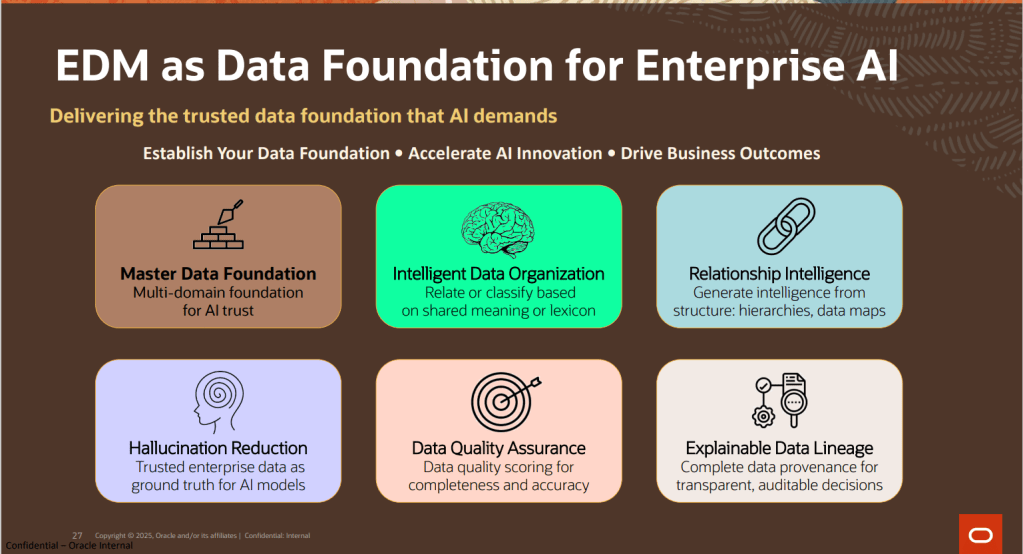
Foundational data governance for AI is arguably the most consequential angle. When enterprise data objects lack clear intent in their descriptions, AI models infer incorrectly. Conflicting hierarchies across ERP, EPM, SCM, and HCM produce inconsistent answers. EDM’s governed descriptions, properties, hierarchies, and cross-application mappings become the ground truth that AI models rely on, reducing hallucination risk and making outputs auditable. If your organisation is investing in enterprise AI, getting master data governance right isn’t optional preparation: it’s what determines whether your AI outputs are trustworthy.
Multi-domain MDM and the roadmap

EDM was built domain-agnostic from day one, which is a genuine competitive differentiator. Competitors largely started in a single domain and expanded. EDM covers Party, Product, Location, Finance, and other domains natively. For Fusion ERP customers, CDM (Customer Data Management) remains the right starting point for mastering customer party records. EDM enriches those with alternate hierarchies, data maps, and cross-application alignment before distributing to EPM and Analytics. For heterogeneous environments with multiple Salesforce instances across regions, EDM can act as the central master customer data hub.

If your Oracle Cloud implementation hasn’t included an EDM conversation yet, it probably should. And if you’re planning an AI initiative on top of Oracle Fusion, EDM is where the trusted data foundation that makes AI outputs reliable actually gets built.

Please note all screenshots are the property of Oracle and are used according to their Copyright Guidelines
What’s New in Oracle HR Help Desk 26A: A Smarter, More Connected Experience

Oracle’s 26A release marks an important step forward for HR Help Desk, with a clear focus on improving the experience for employees, HR teams and service managers alike. Built entirely on the Redwood user experience, this release reinforces Oracle’s direction of travel: HR Help Desk is evolving from a traditional case management tool into a smarter, more responsive service platform that blends self‑service, automation and AI‑assisted support.

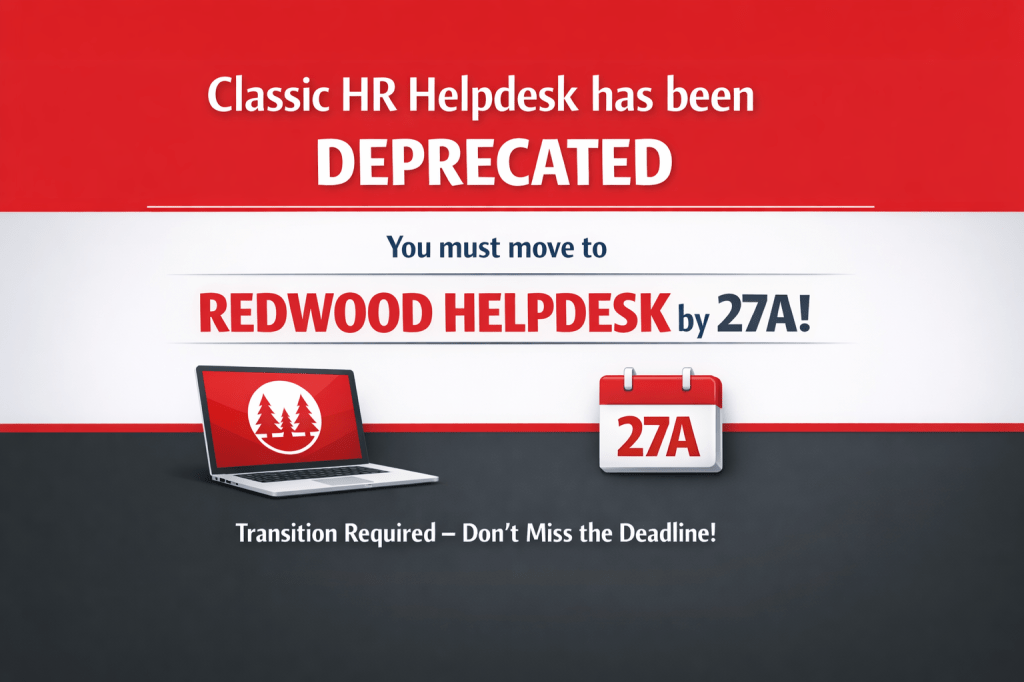
A key message is that Redwood is now the standard. The Classic HR Help Desk experience has been deprecated and will not receive further feature enhancements, with customers expected to complete their move to Redwood ahead of the 27A release. Any new HR Help Desk implementations must use Redwood from the outset. For organisations that have not yet made the transition, this release is a clear signal that now is the right time to plan and prepare.

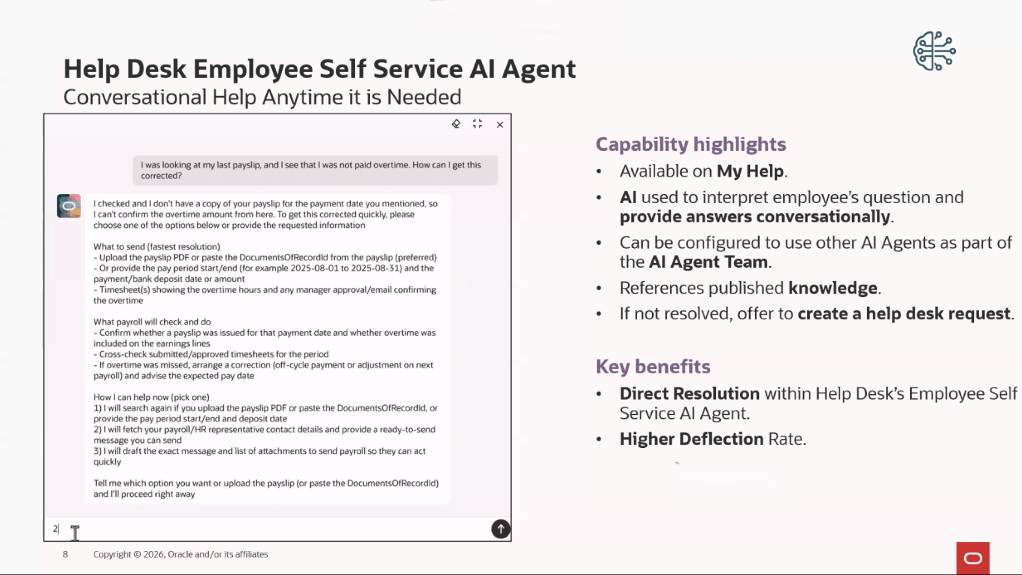
From an employee perspective, 26A introduces a more intuitive and conversational way to get help. A new AI agent within My Help allows employees to ask questions in plain language and receive answers based on published HR knowledge, with the option to raise a request or be guided to the right support when needed. At the same time, Oracle has strengthened how requests are presented to employees by ensuring that primary contacts only see information intended for them, keeping internal notes and agent‑only details out of view by default.

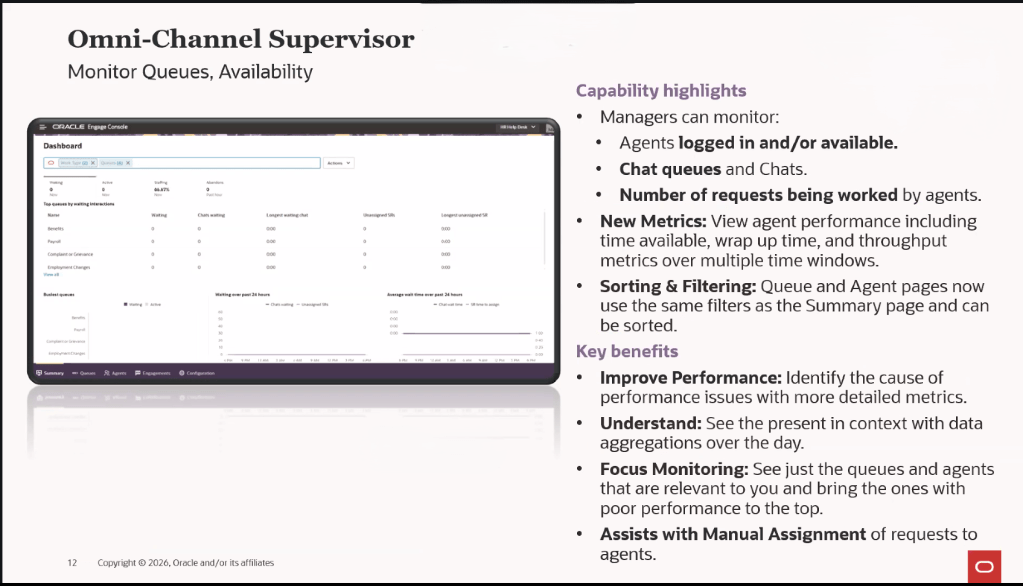
HR agents and supervisors also benefit from more control and visibility. Enhancements to the omnichannel supervisor dashboard make it easier to see agent availability, workload and queue performance, with new metrics supporting better day‑to‑day decision‑making. Case handling has been refined too, with smarter assignment options, improved search, and the ability to upload case documents directly into employee document records. AI‑assisted case analysis is available throughout the case lifecycle, helping agents identify next steps or similar cases, particularly in more complex situations.

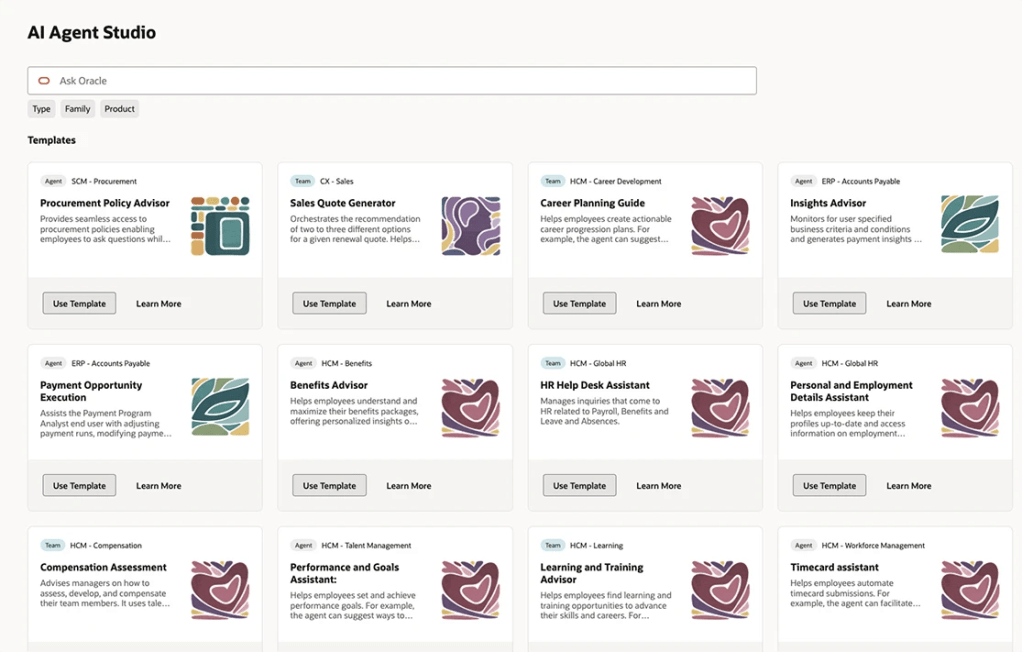
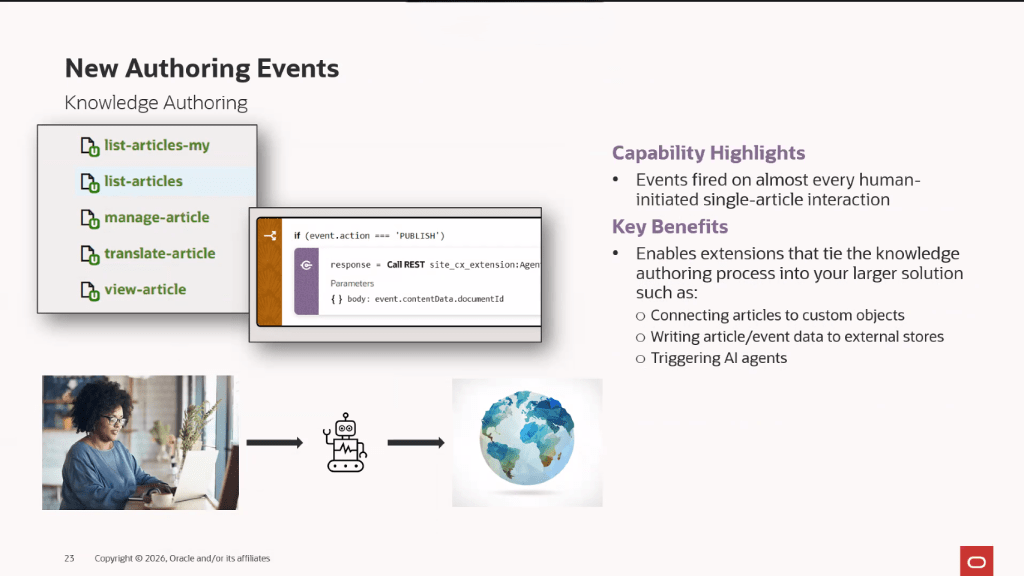
Knowledge management continues to play a central role in HR Help Desk, with 26A introducing new tools to create, structure and reuse content more effectively. Oracle has expanded its AI Agent Studio, added richer attributes for knowledge content, and enabled the use of generative AI to create articles for custom content types. Knowledge events can now be surfaced to support wider integration and automation. Taken together, these changes show Oracle’s continued investment in making HR Help Desk more intelligent, scalable and ready to support modern HR service delivery.

Please note all screenshots are the property of Oracle and are used according to their Copyright Guidelines
Unlocking Real‑World Value with Oracle’s AI Factory

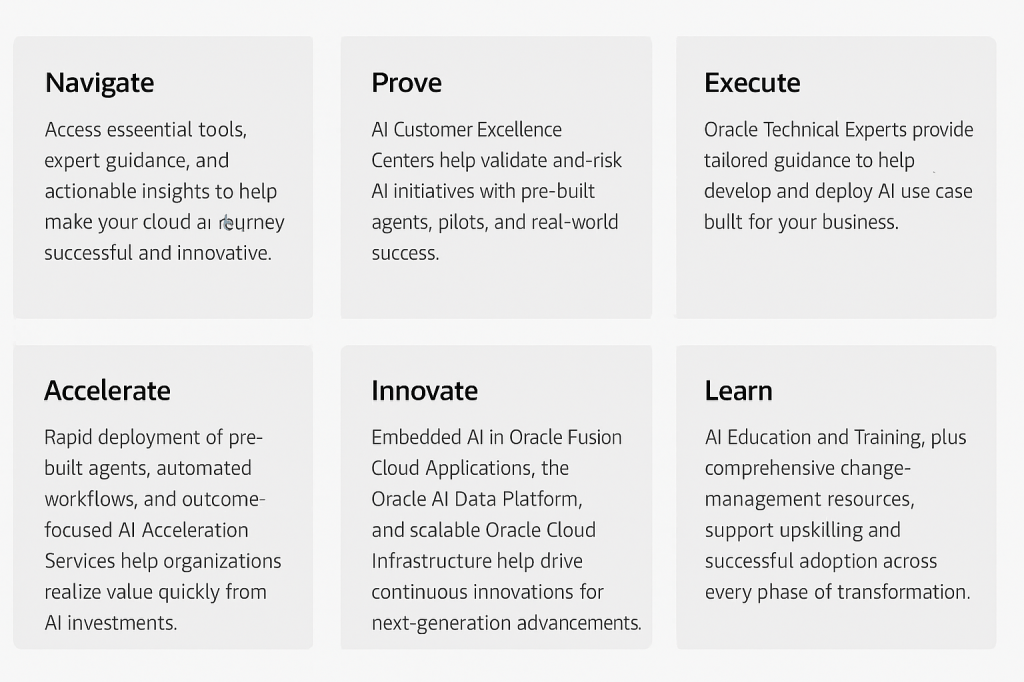
AI is moving at an incredible pace, and it can feel hard to know where to start, or how to get real results quickly. That’s exactly where Oracle’s AI Factory comes in. It gives organisations a clear, practical way forward, with step‑by‑step guidance, useful tools, and expert support to help you adopt, scale, and make the most of AI across Oracle Cloud Infrastructure, Oracle Database, the Fusion Applications Suite, and industry solutions.

Instead of trying to figure everything out on your own, you can tap into prebuilt use cases, clear guidance, and tried‑and‑tested patterns that cut down on both effort and risk. The framework is all about driving real, measurable improvements, whether that means modernising legacy systems, unlocking real‑time insights, or making the most of the embedded AI already available across Oracle’s application suite.

Many organisations don’t realise just how deeply AI is already built into Oracle’s technology stack. Once they see what’s possible, the same questions usually come up: Where do we begin? What does success look like? How do we make sure we see real value? Oracle’s AI Factory is designed to answer exactly those questions and guide customers through every step of the journey. With support from Oracle’s experts and the AI Customer Excellence Centres, you can validate ideas, shape use cases, and run pilots with confidence, all while keeping innovation moving without taking on unnecessary risk.

The first tool in the new AI Factory toolkit is one I already use, and genuinely love. Oracle’s Cloud Success Navigator is an AI‑powered platform that supports customers through every stage of their Oracle Cloud journey, from best‑practice guidance to migration support, feature updates, and resources that help speed up adoption. It brings everything together in one place: useful tools, expert insights, and clear, structured guidance to help organisations get implementations right, stay up to date with new capabilities, and get more value from their investments. By cutting through the complexity that often comes with cloud decisions, it helps teams move faster, reduce risk, and take full advantage of Oracle’s latest innovations across infrastructure and applications.

Oracle’s AI Customer Excellence Center gives organisations a practical, low‑risk way to explore and validate advanced AI and multicloud architectures by working directly with Oracle experts. It’s essentially a global hub where customers can try out proof‑of‑concepts, refine complex designs, and make sure their AI solutions perform reliably at scale. With this expert support on hand, teams can move faster, de‑risk big ideas, and make well‑informed decisions as they modernise and adopt AI across cloud, hybrid, or multicloud environments. It’s all about giving customers the confidence to innovate, without the unnecessary guesswork.

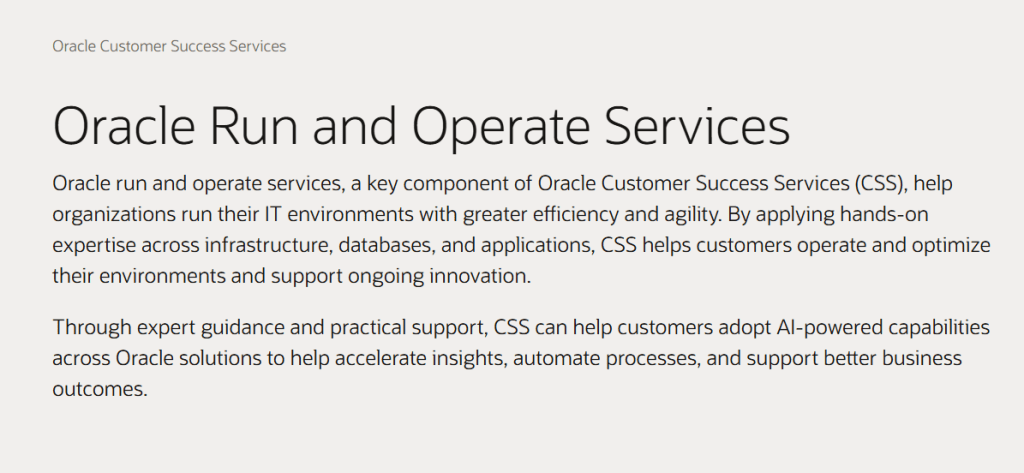
Oracle’s Operate services help organisations run their Oracle technology more efficiently by giving them hands‑on expertise across infrastructure, databases, and applications, while also opening the door to AI‑powered capabilities that streamline day‑to‑day work and support better decision‑making. The idea is simple: free up your internal teams to focus on innovation and higher‑value work, while Oracle takes care of the smooth running, optimisation, and ongoing evolution of your cloud environment. It’s a practical way to stay agile, reduce operational risk, and get more from your Oracle investment.

Oracle’s Innovate services are all about helping organisations adopt new Oracle capabilities quickly and confidently. They combine expert guidance, proven best practices, and time‑saving automation to speed up transformation and make the whole process feel far more manageable. Because these services are closely connected with Oracle Product Development, and delivered in collaboration with partners, customers get the support they need to embrace AI‑powered features, modern cloud technologies, and continuous improvement across their Oracle estate. The goal is simple: reduce risk, shorten implementation timelines, and ensure organisations can unlock long‑term value and innovation from their Oracle investments, all while keeping pace with fast‑changing business demands.

I love that Oracle has pulled together a complete toolkit across Applications, Data, and Infrastructure to support organisations on their AI journey. I keep a close eye on what others in the market are doing, and time and again it feels like Oracle is ahead, not just in delivering the technology, but in giving customers the tools and guidance they need to get real value from it. I’m genuinely excited to hear more about AI Factory and see what comes next. If you’re interested in exploring how it could help your organisation, now’s the perfect time to start the conversation.

Please note all screenshots are the property of Oracle and are used according to their Copyright Guidelines
Why Embedded AI Is the Real Differentiator in Enterprise Automation

AI is everywhere at the moment, there’s really no getting away from it, but not all AI is created equal. Plenty of platforms promise co‑pilots, assistants and automation, yet very few can actually take action inside core business systems. That’s why Oracle’s approach with AI Agent Studio for Fusion Applications really stands out.

Most enterprise AI tools today act as co‑pilots: brilliant for drafting content or answering questions, but far less capable when it comes to genuine process automation. Oracle has taken a different approach. Its AI agents are embedded directly within Fusion Applications, giving them the power to:

  • Understand business data in real time
  • Make decisions with full context
  • Write back into transactional systems securely
  • Automate tasks end‑to‑end without relying on extra tools

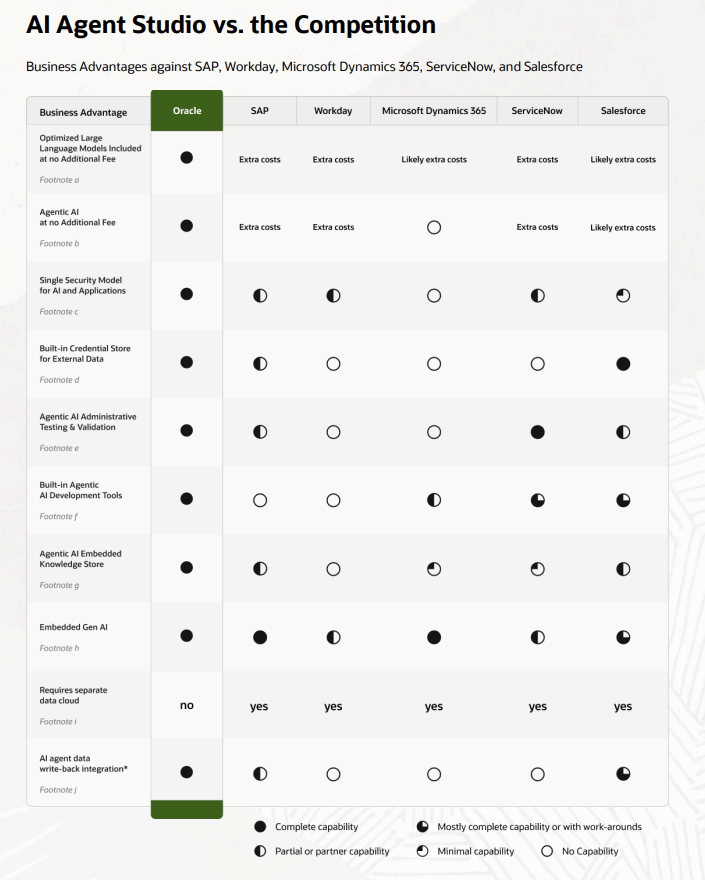
This isn’t AI “bolted on”, it’s AI woven right into the core of the application. And yes, I realise I’m starting to sound like an Oracle salesperson, but the difference between Oracle and other providers is hard to ignore. The image below highlights just how significant that gap is, comparing what Oracle delivers with five other major service providers.

Across the market, vendors are running into the same familiar obstacles:

  1. Added AI costs. Whether it’s Copilot capacity, ServiceNow’s AI tiers or Salesforce Flex Credits, AI is frequently positioned as an optional extra rather than something included as standard.
  2. Co‑pilots, not agents. Microsoft, Salesforce, Workday and others are excellent at generating content and offering recommendations, but they seldom deliver true autonomous action within transactional systems.
  3. Fragmented platforms. Many providers depend on several data models, clouds and integration layers. Their AI often relies on separate analytics environments or copied data, which strips away workflow context and makes automation far more difficult.

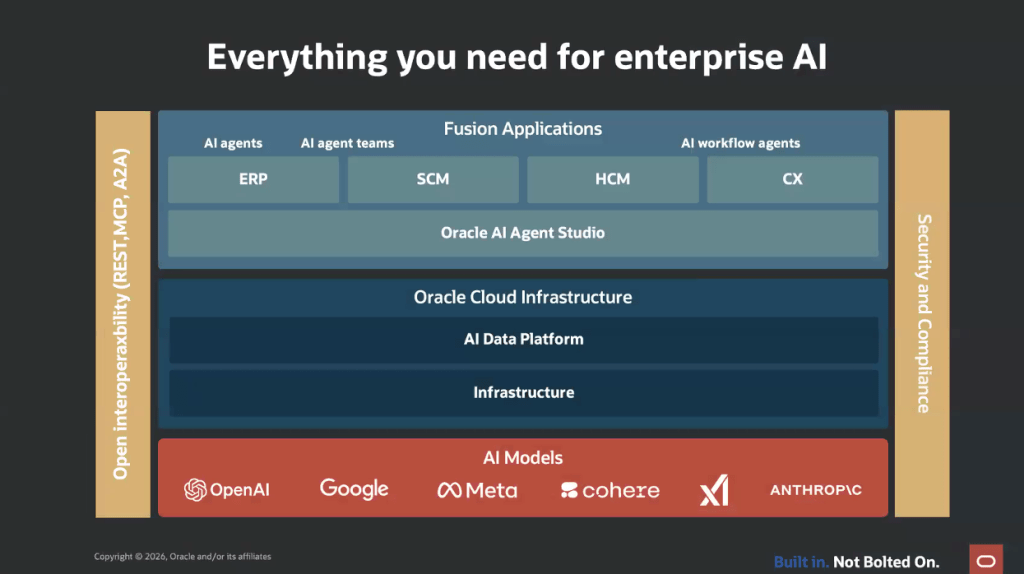
You may have already come across Oracle’s One Platform, and this is where Oracle really pulls ahead of the pack. Oracle keeps things refreshingly straightforward: Fusion Applications, data and AI all sit within a single, unified ecosystem. That brings three key advantages:

  • Embedded intelligence — agents work directly inside the applications employees use every day.
  • A unified security and data model — consistent governance and safer, more reliable automation.
  • True write‑back — agents can update transactions natively, without middleware or separate AI clouds getting in the way.

So you might be wondering, “That all sounds impressive, but what does it actually mean for me?” At its core, agentic AI is about cutting down manual effort, improving accuracy and boosting operational efficiency. Oracle’s embedded approach ensures that automation is reliable, properly governed and able to scale as your business does. Crucially, it isn’t stitched together from multiple products. With Oracle, AI is built in, a fundamental part of the system that runs your business, not an optional extra layered on top. It marks a shift from AI that simply talks, to AI that genuinely delivers.

Please note all screenshots are the property of Oracle and are used according to their Copyright Guidelines
METRO – The Jewel in the Crown in Oracle AI Agent Studio

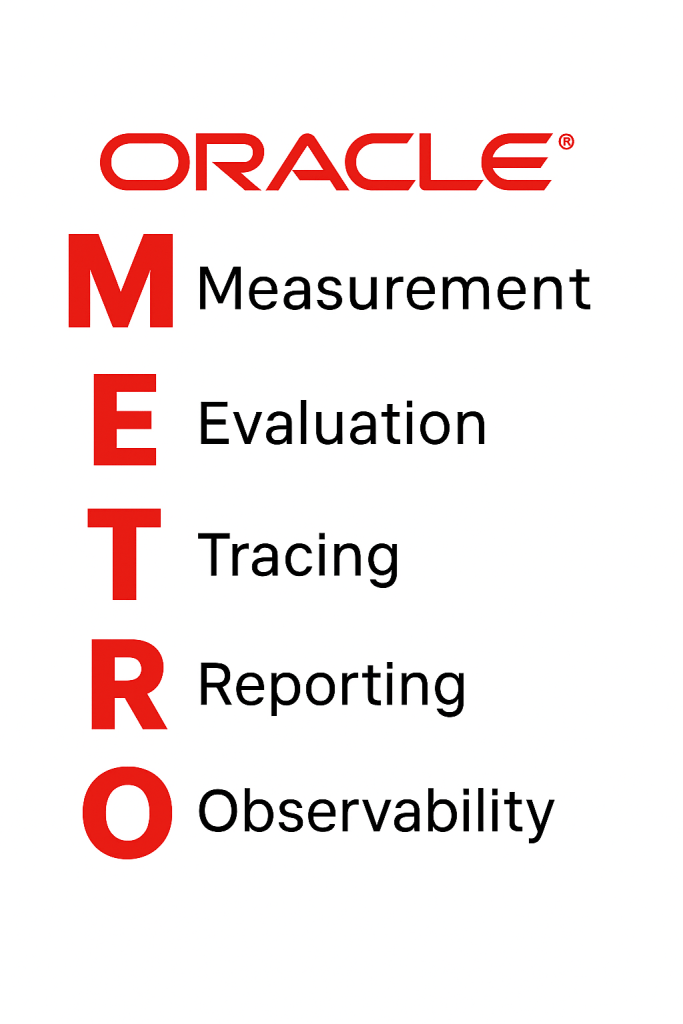
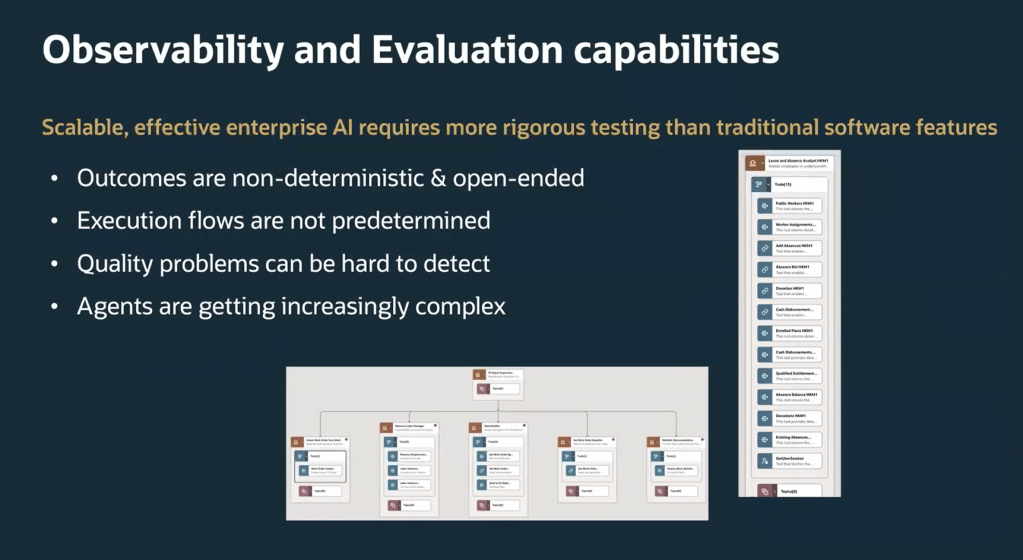
Have you heard about METRO? METRO is the embedded measurement and observability framework within Oracle AI Agent Studio. It stands for:

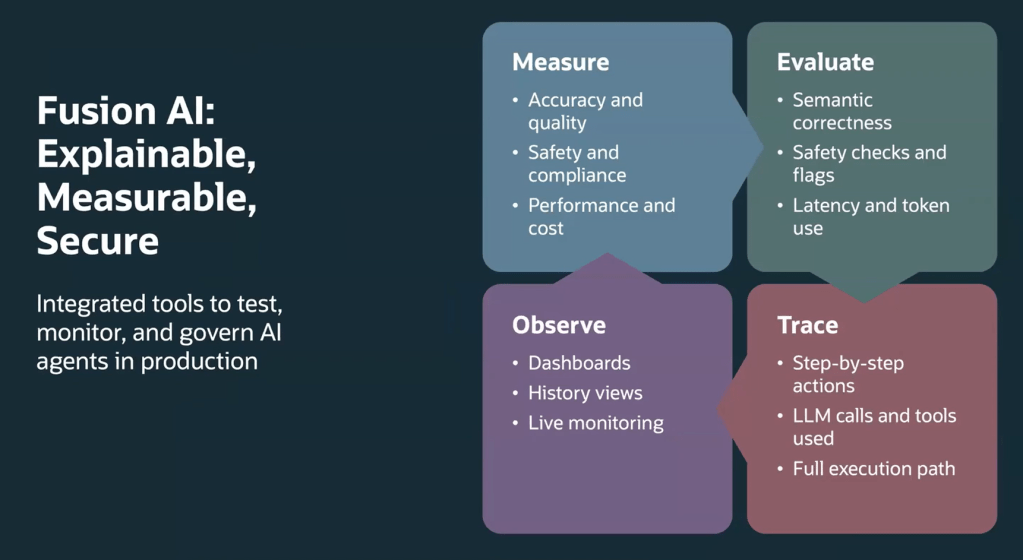
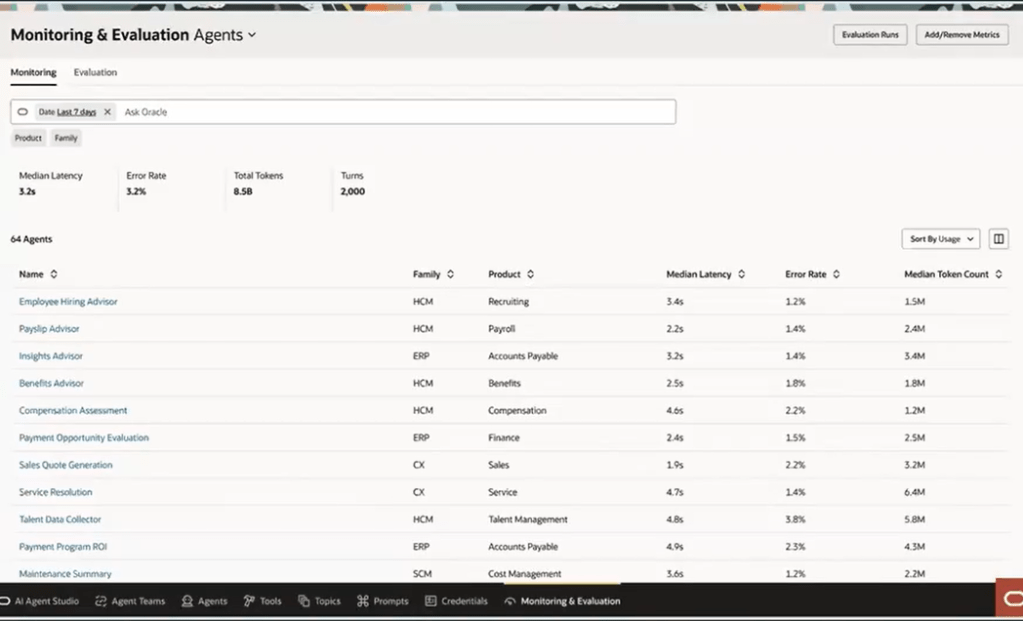
Oracle have introduced METRO as part of release 25D. It is a brand-new set of monitoring and evaluation tools built right into Oracle AI Agent Studio. Think of METRO as your control centre for AI agents in production. It gives you everything you need to keep an eye on accuracy, compliance, performance, costs, latency and even token usage. In short, it helps you make sure your agents are doing exactly what you expect, without any surprises.

The world of AI agents isn’t straightforward, responses can vary, workflows aren’t always predictable, and traditional checks don’t always work. That’s where METRO steps in. It’s designed for this new reality, offering smart ways to check semantic correctness, track detailed performance metrics and keep guardrails in place against risks like prompt injection. Whether you’re running complex multi-agent setups or more structured workflows, METRO makes it easier to stay on top of quality and reliability.

One of the best parts? The dashboard. It gives you a clear view of key stats like latency, error rates, token counts and correctness scores. And if you want to dig deeper, you can trace every single step an agent took, from LLM calls to tools used and outputs generated. This level of detail means you can troubleshoot quickly and optimise performance without the guesswork.

METRO also helps with testing, using the industry-standard LLM-as-a-Judge approach to score responses and provide feedback you can act on. Combine that with new features in 25D, like deterministic workflow agents and support for models such as GPT‑5 mini, and you’ve got flexibility to build agents for any scenario.

METRO isn’t just another feature, it’s a game-changer for anyone looking to manage AI agents with confidence. By combining deep insights, flexible evaluation tools and full traceability, it gives you everything you need to keep your AI ecosystem running smoothly. And with the added power of new models and workflow options in 25D, you’ve got all the tools to innovate faster and smarter. The future of AI governance starts here and METRO makes it simple!

Oracle HCM Cloud Recruit 26A

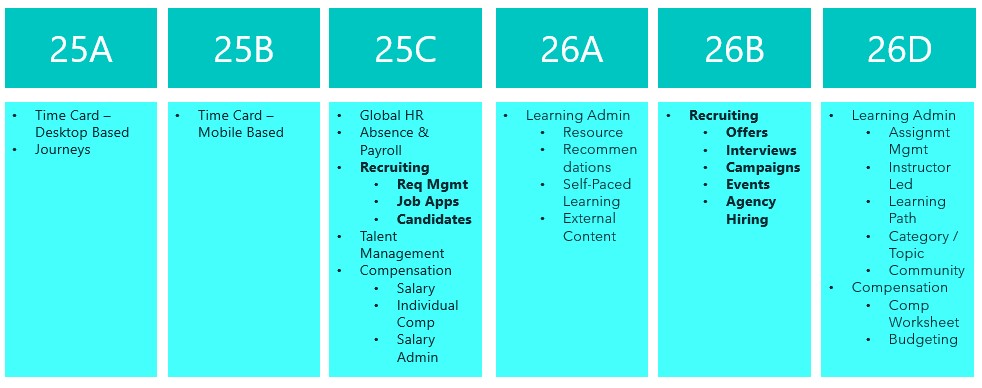
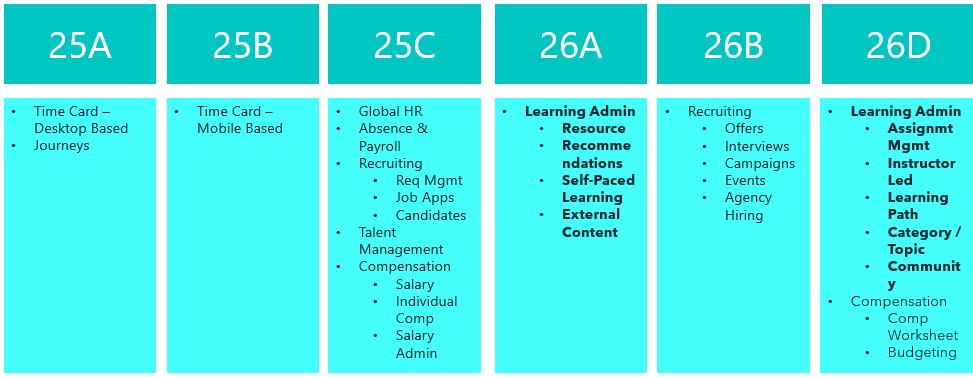
Things are really heating up in the world of Recruit as we approach the final deadline to move the remaining Recruiting pages over to Redwood in 26B. This release is your last opportunity to make the switch. With the 25C deadline behind us, you should already be managing requisitions, job applications and candidates in Redwood. The next phase brings exciting updates around offers, interviews, campaigns, events and agency hiring. So, let’s dive in and see what’s new…

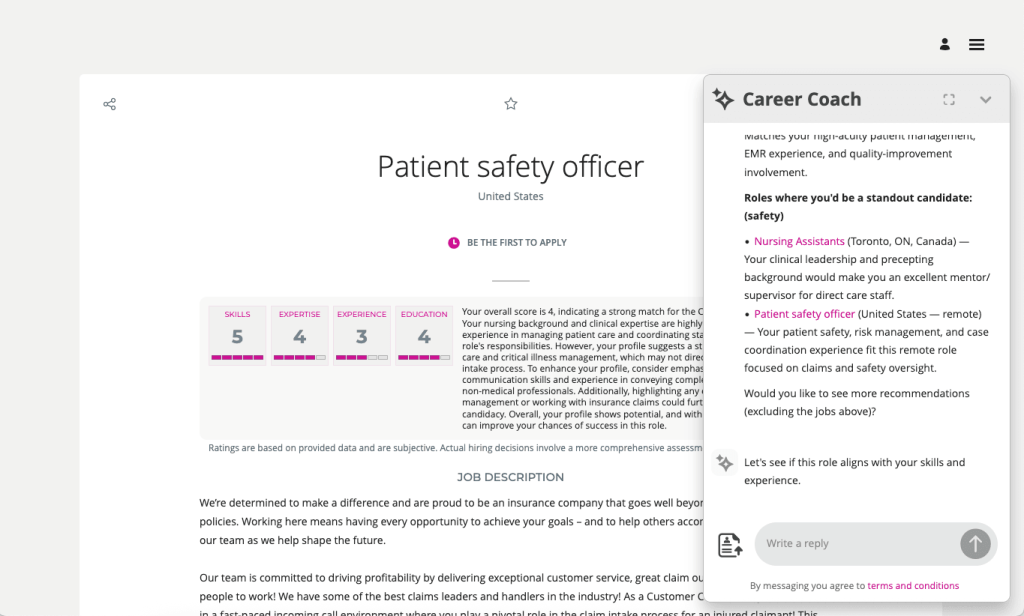
The AI Career Coach, first introduced in 25D to help candidates find roles that match their skills, has already been enhanced in 26A. The Career Coach now uses the Supervisor model, which brings all agents together under one umbrella, streamlining information sharing and removing redundancies. The agent is pre-seeded and ready to run, so there’s no need to create agents from templates. You can also choose to display the widget as an overlay, ideal for highly customised sites, rather than the default side panel, ensuring it doesn’t interfere with your design. For one-page application flows, the widget now displays correctly, and when shown as a side panel, the navigation menu is replaced with a horizontal progress bar. The fixer button appears on the page instead of the left-hand side, and a clickable Terms and Conditions link pulls content from the job application legal disclaimer in the Recruiting Content Library. If you’ve enabled CV parsing, candidate CVs will be parsed into the application flow when uploaded via the widget. From this release, any CV uploaded into the recommended jobs widget in the candidate experience will also be available to the agent.

As many of you know, I’m a big fan of AI, anything that makes life easier. The next update introduces an AI assistant for job requisition creation, working like a smart, on-page helper that answers both general and field-specific questions as you build a requisition. Because its guidance is driven entirely by the documents you upload and the prompt you configure, it’s easy to tailor to your organisation’s policies and practices. The agent helps users get it right first time, capturing the correct data, minimising downstream issues and boosting overall efficiency without interrupting the flow.

By 26B, the Job Offer process must be fully transitioned to Redwood, and Oracle has introduced a new AI agent to make this easier. Acting as an FAQ-style assistant, the agent helps users by answering both general and field-specific questions during job offer creation. Its guidance is based entirely on the documents you upload and the prompt you configure, making it simple to align with your organisation’s policies and practices. This smart assistant ensures job offers are created smoothly, reduces downstream issues by capturing accurate data, and boosts overall efficiency without disrupting the process.

Another useful Redwood Offer feature is the Initiate Job Offer Creation for Hiring Managers functionality. Hiring managers with the Initiate Job Offer privilege can now start the process and share notes with the recruiting team using the Create Job Offer action from the Redwood job applications list or details page. On the Create Job Offer page, they can add comments in the Notes to Recruiter field to provide context or instructions. Once they click Save and Close, the candidate’s application moves to Offer – Draft status and appears on the Redwood Job Offers list page. The recruiter receives a notification to complete the offer details using the Edit Offer action, with the manager’s notes displayed in a banner above the Details and Offer tabs. When ready, the recruiter can submit the job offer for approval or save it for further editing later.

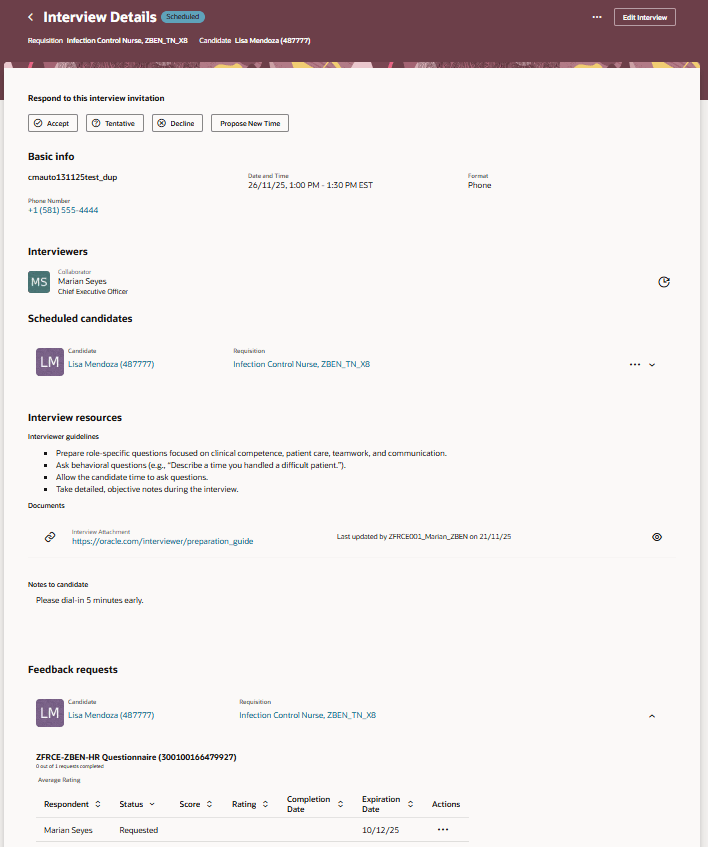
The final feature worth mentioning is the new Redwood Interview Details page, which brings several improvements over the previous responsive version. A new Basic Info section now displays key interview details at a glance. In the Interviewers section, you can easily resend the Interview Scheduled notification, handy if someone says they haven’t received it. The Scheduled Candidates section allows you to click candidate and job requisition links to open a drawer with more information, and the Actions menu lets you manage candidates scheduled for the interview. Under Interview Resources, you’ll find interviewer guidelines, attachments and candidate notes added to the interview. If you’re an interviewer, you can respond directly to the invitation, accept, tentatively accept, decline or propose a new time. When proposing a new time, the drawer can even display your availability if calendar integration (Microsoft 365 or Google) is enabled.

Oracle often slip in new features during the month, so it’s worth keeping an eye out. If anything truly game-changing appears, I’ll share another blog post to keep you updated and make sure you don’t miss out. In the meantime, why not check out my latest write-up on the new Core HR features in Release 26A? You can find it here.

Please note all screenshots are the property of Oracle and are used according to their Copyright Guidelines
Oracle HCM Cloud Learn 26A

Release 26A has arrived, marking the start of the second phase of Recruitment for Learn becoming mandatory. This update sets the deadline for the first half of the required changes to Learning Admin pages, covering Resources, Recommendations, Self-Paced Learning and External Content. The remaining updates to Learn Admin pages will become mandatory with Release 26D. Let’s take a look at what is new!

Before you can use this first feature, Dynamic Skills must be enabled. Oracle have updated the licensing for Dynamic Skills over the past year, so it may already be included in your Core HR licence. If you’re unsure, it’s worth checking with your Oracle Customer Success Manager. Once enabled, you can take advantage of the AI Learning Catalogue Smart Search Advisor. This clever tool lets you search the learning catalogue using questions rather than just keywords, delivering more focused and higher-quality results. The results are semantically relevant to your query and tailored to you, taking into account your work history, talent profile and learning record. When active, you’ll notice a new section on the learning catalogue page after you search. This section highlights up to five learning items the advisor has identified as most suitable for you and your request.

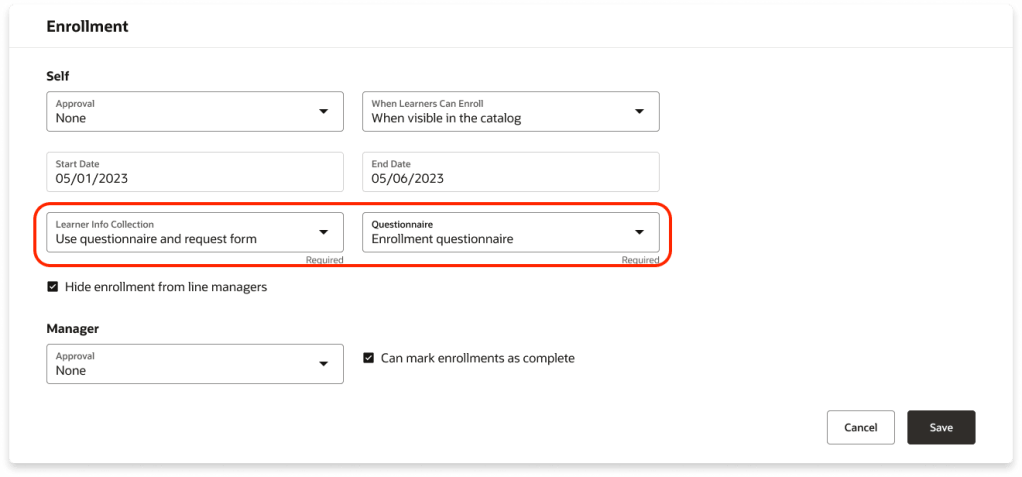
There are several new features for Self-Paced Learning, starting with Redwood functionality for enrolment forms, evaluations and feedback. You can now collect the information you need when learners enrol by requiring an enrolment form, a questionnaire, or both. The Learner Info Collection options available in the Self-Paced Learning configuration under the Rules tab in the Enrolment section, offering four choices: no extra information, a combined page with both questionnaire and request form, just the questionnaire, or just the request form, each leading to the Enrolment Details page. These options are controlled by a single setting within Self-Paced Learning.

Oracle has added support for two new content types in Self-Paced Learning: CMI5 and AICC URLs. You can now upload CMI5 .zip archive packages when creating self-paced courses. This format combines the structured approach of SCORM with the flexible, detailed tracking of xAPI, enabling richer data sharing between the learning item and the server. The result? Deeper insights into learner progress and engagement. In addition, you can create self-paced courses by adding an AICC URL as content. Once the page refreshes, the Learning Format field appears, defaulted to Online Course, alongside the Mastery Score field. You can adjust the format as needed and set a mastery score, which moves to its usual spot on the Rules tab under Completion when you create the draft. The score can be updated later if required.

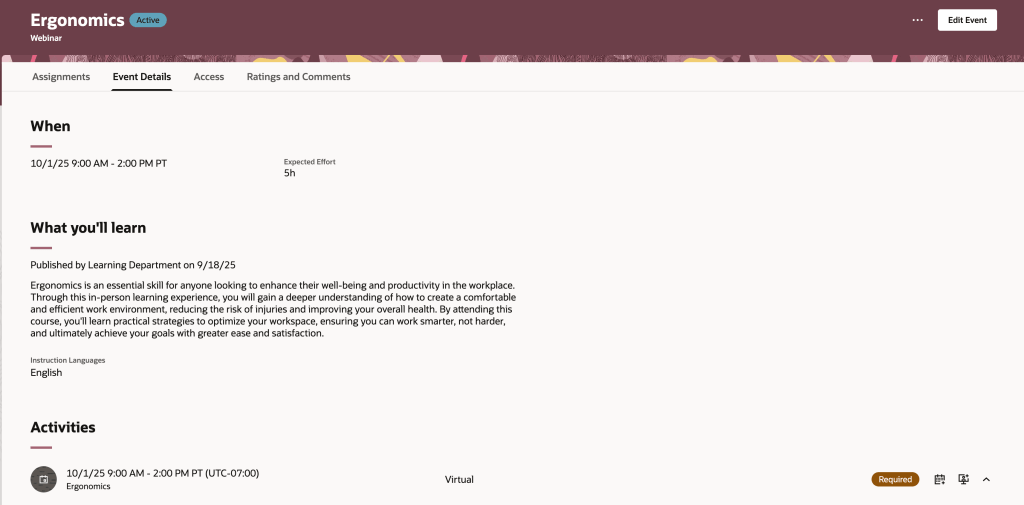
Oracle has introduced a new Redwood Learning Events page, offering a streamlined way to publish instructor-led training directly to your learning catalogue. This update simplifies setup and adds flexibility, allowing events to be defined by formats such as In-Person, Webinar, or custom options tailored to your organisation. Events can be delivered as standalone offerings or included in a course for equivalency, with improved scheduling that supports multiday and overnight sessions and calculates effort automatically. You can specify dates and times via a calendar or manual entry, integrate feedback through evaluations and ratings, and control when learners provide it. Enrolment periods can now be configured separately from catalogue visibility, enabling early access via deep links, while enhanced withdrawal and waitlist options give greater control. Although events cannot yet be added to specialisations and pricing isn’t included in this release, both features are planned for future updates.

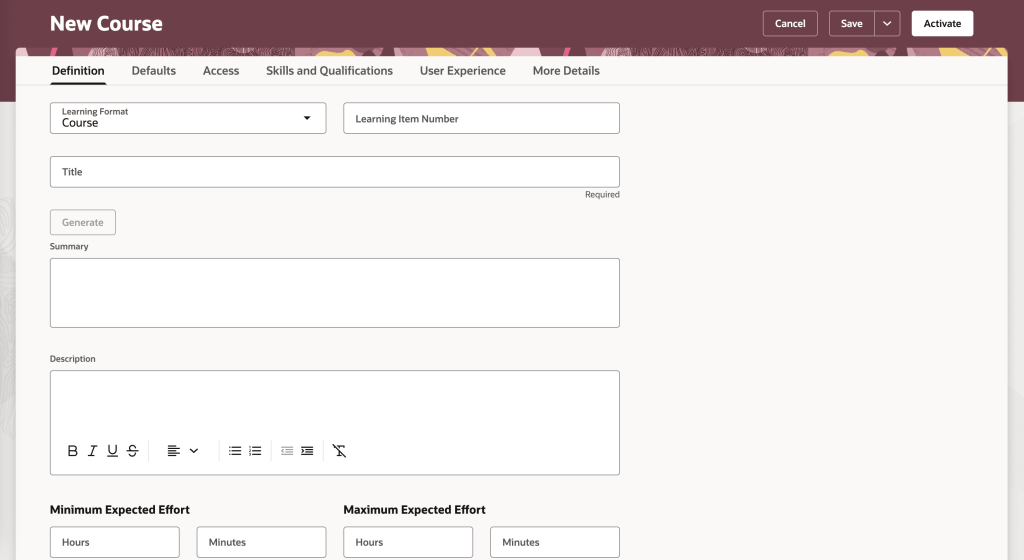
The final feature worth highlighting is the new Redwood Course Management page, which brings a modern, visually appealing interface to Oracle Learning. Learning Specialists can now enjoy a streamlined experience with grouped tabs for managing courses, Definitions, Defaults, Access, Skills and Qualifications, User Experience, and More Details, alongside a step-by-step creation process for organising core details, descriptions, visuals and settings. All course offerings, whether instructor-led, self-paced or blended, plus associated events, are accessible from a single Offerings tab for quicker navigation. Learners benefit from improved course detail pages with clearer layouts, showcasing included content, expected effort, acquired skills, instructors, outcomes, languages and celebratory completion notices. They can also engage through ratings, comments and lively discussions via dedicated interaction tabs.

Oracle often slip in a few extra features during the month, so it’s always worth keeping an eye out. If anything truly exciting comes along, I’ll share another blog post to keep you updated and ensure you don’t miss out. In the meantime, take a look at my latest write-up on the new Core HR features in Release 26A, you can find it here.

Please note all screenshots are the property of Oracle and are used according to their Copyright Guidelines

Oracle HCM Cloud Payroll 26A

It’s that time again, quarterly release time, and there’s plenty to look forward to! With Oracle’s strong focus on AI, Release 26A promises some exciting updates. Oracle often adds extra features throughout the month, so keep an eye out for more enhancements as they arrive. This release is especially important for UK Payroll customers, as it includes all the new tax year functionality.

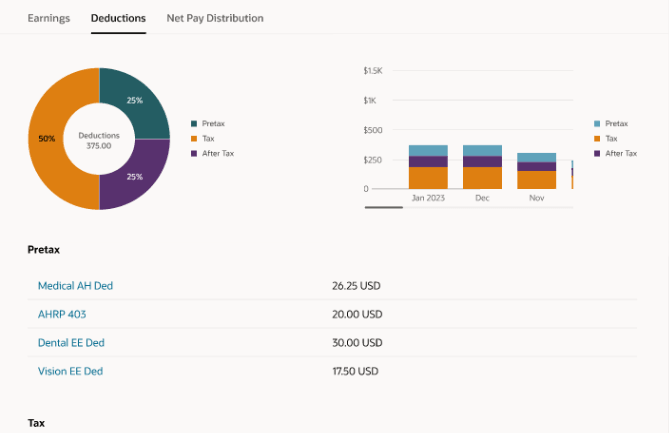
Global Payroll introduces an exciting new AI-powered tool, the Payroll Administrator Troubleshooting Agent. Known as the Payroll Run Analyst, this assistant helps payroll administrators validate employee payroll results directly from the Payroll Results page, including reviewing statements of earnings. Built on Oracle’s AI Agent framework, it delivers secure, role-based information within your permissions and significantly reduces manual effort during payroll reconciliation. It also streamlines corrective actions with deep links to related HCM pages, such as earnings and deductions, for quick updates. Best of all, it requires no extra setup and is ready to use immediately, with a chat experience coming in a future release.

Another feature worth highlighting is the redesign of payslip templates using the Redwood toolkit. The new Redwood Payslip offers a far better experience than the previous responsive version, but until now it only worked with the seeded payslip, which most organisations don’t use. With this update, the Redwood payslip can be viewed online or downloaded, and the PDF/UA templates are fully accessible while meeting all legislative requirements for payslip reporting. To stay compliant with local regulations, Oracle recommend adopting the Redwood payslip template as soon as possible.

As mentioned earlier, this release includes the UK legislative updates for the new tax year. Please note that a monthly patch may be required to incorporate any additional changes announced by the UK Government closer to April. One key update relates to the Full Payment Submission (FPS). You can now choose whether employee addresses are reported for all employees or only new starters. This option applies to the FPS processes for tax years ending April 2025 and April 2026. To set this, use the new field Employee Address on FPS from Tax Year 2024–25 on the organisation-level Statutory Deductions calculation card. By default, this is set to All Employees.

There’s also an update to the P60 template for the 2025/26 tax year. A new Statutory Neonatal Payment field has been added to the Statutory Payments section of the P60, along with a corresponding balance in the UK Balances for the End-of-Year Archive group. To generate and issue P60 End-of-Year Statements to employees, use the updated templates for 2025/26: Type LE(P), eP60 – Online and Plain Paper.

New payroll attributes have been introduced to help organisations set up adoption, maternity, and paternity absences for calculating benefit payments or offsets. Detailed steps are provided to guide you through creating the necessary elements, entitlement formula result rules, balance feeds, and validation formulas based on delivered templates. You’ll also find instructions for setting up entitlement formulas, certificates, absence plans, and absence types, ensuring a smooth and compliant process.

Oracle has now introduced Advance Pay for Irish legislation, giving employees the option to request payment before going on holiday. The amount is then recovered over a set period, such as weekly, bi-weekly, or lunar cycles, as needed. Before processing Advance Pay, make sure all other earnings and deductions have been completed. You’ll also need to configure Advance Pay usage and ensure that earnings are correctly processed during the holiday period.

Enhanced Reporting Revenue (ERR) Requests are now available, making compliance easier. After payroll runs and prepayments that include ERR element entries, use the Run Enhanced Reporting Submission Request. You can also run this process for a specific time period to report on unprocessed ERR entries, such as Travel and Subsistence, Remote Working Daily Allowance, and Small Benefit Exemption. The process generates three outputs: an ERR Audit Report showing archived employee and element details, an Errors and Warnings report, and a JSON file for Revenue submission via the Send File Submission process. For corrections, use the Run Enhanced Reporting Correction Request on previously submitted ERR files. This creates a revised JSON file, an ERC Audit Report, and an Errors and Warnings report—ready to send to Revenue.

As I mentioned earlier, Oracle usually drops extra features throughout the month, so keep an eye out! If anything really exciting comes along, I’ll post an update to make sure you’re in the loop. In the meantime, why not check out my latest blog on the new Core HR features in Release 26A? You can find it here.

Please note all screenshots are the property of Oracle and are used according to their Copyright Guidelines
Oracle HCM Cloud Core HR 26A

It’s the most wonderful time of the quarter! Sorry, I just put up my Christmas tree and now I’m feeling festive. Oracle have just announced the latest features that will be coming in release 26A. As you would expect, it’s an AI heavy one! As usual, additional features may follow later this month. In the meantime, let’s review what’s been introduced so far.

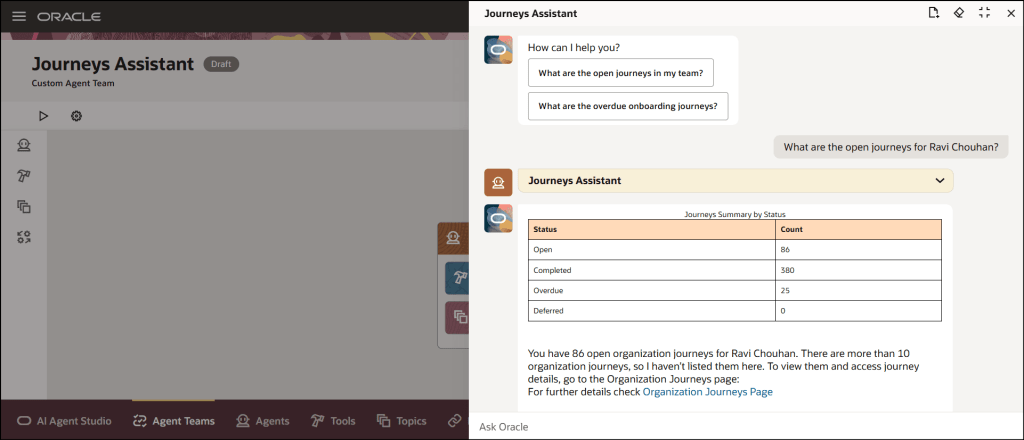
The first feature is one I saw at AI World in October and I thought it was great, so I’m glad it’s here now. The new Manage Journeys with AI Assistant makes managing employee journeys so easy. Powered by Oracle’s AI, it understands your everyday questions and gives you clear answers that fit your organisation’s rules. Need to check overdue tasks, see onboarding progress, or jump straight to the right page? Just ask. It cuts through the clutter, saves you time, and means less training for your team. Managers and HR can quickly get the info they need without digging through menus, so you can spend less time clicking and more time supporting your people.

Everyone loves a good dashboard, and now there’s the new Redwood View Legal Employer Changes Dashboard. It’s your one-stop shop for reviewing and keeping track of all global transfers, but only those that you have access to. The dashboard gives you a clear summary of each worker’s transfer details, making it easy to stay on top of changes. One thing to note: even if the Change Legal Employer dashboard is enabled for Redwood, the deep links on this page still follow their own product-specific profile settings. For example, if you click the Compensation Info link, it will open the Compensation page based on its profile option. It will only open in Redwood if that page’s Redwood setting is enabled, otherwise it will open in the responsive view.

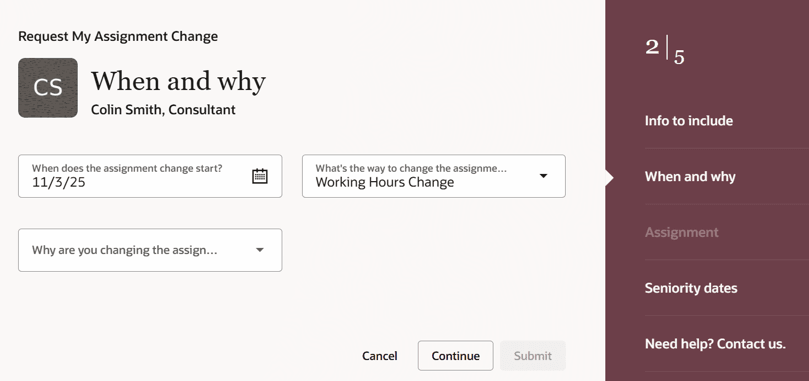
HR teams already have plenty on their plate, so there’s a growing shift towards employees taking ownership of their own data and using self-service wherever possible. The new Request My Assignment Change feature makes this easier than ever, allowing employees to update their own assignment details through a simple Redwood process. From the self-service interface, employees can now request changes to update their work location or adjust their working hours, without any HR involvement. The Request My Assignment Change process uses the existing assignment approval framework. To customise approvals for this request type, configure rules with:
sensorDataReferenceCode = "RequestMyAssignmentChange".

Two new AI features are now available in Workforce Structures: the Job Assistant and the Workforce Structures Insight Analyst. The Job Assistant speeds up creating roles by asking a few simple questions and setting up the job with minimal details like name and code – quick, straightforward, done. The Workforce Structures Insight Analyst is where things get really powerful. Acting as an intelligent companion, it gives you instant access to workforce structure data without the need to build custom reports or navigate complex analytics. You can ask natural language questions and receive clear, actionable answers tailored to your organisation’s policies. Managers can quickly get summaries of job families, positions, and organisational hierarchies; compare structures across teams; and even analyse areas that aren’t covered by standard reporting tools. It’s designed to save time, reduce complexity, and provide insights that help you make informed decisions faster, all from a single, intuitive interface.

The Document Records Management Assistant brings AI to one of the most essential yet often overlooked areas, document records. This smart assistant makes creating, organising, and finding records quick and effortless. Using advanced language models, it understands the context of each document type and offers helpful suggestions, so you can capture records accurately, categorise them correctly, and retrieve them when needed. With natural language interaction, direct links, and intuitive guidance, it removes complexity, reduces training, and even anticipates intent, such as fetching the latest passport record. In short, it streamlines document management into a simple, conversational experience.

As mentioned earlier, Oracle will be rolling out new Core HR features later this month. If any of these updates turn out to be particularly significant, I’ll share an updated blog post with the details. In the meantime, keep an eye out for upcoming posts where we’ll dive into other Fusion modules as part of Release 26A.

Please note all screenshots are the property of Oracle and are used according to their Copyright Guidelines
Oracle AI World – Day 3

Day 3 was the last day of Oracle AI World and whilst it was only a half day, it was one of my favourites! We all breakfast together, before going our separate ways. It was a lovely start to the day. I managed to fit in two sessions, one on AI Powered EPM and the final one was Amplifying Human Potential. I had lunch with lots of my fellow ACE program members, before we all went off on our ACE Adventure to the Atomic Museum.

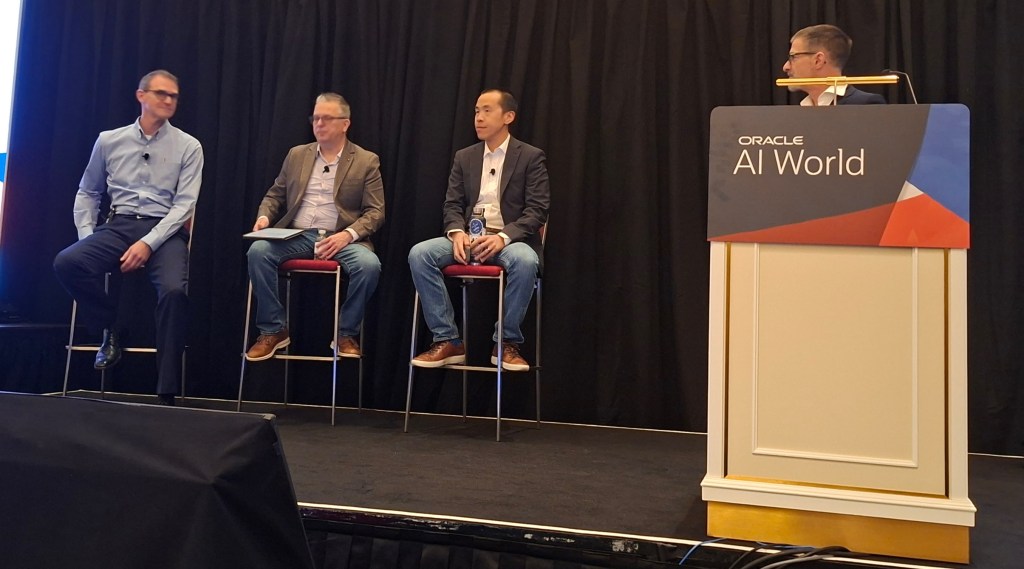
The first session was on AI Powered EPM. Not only was the customer panel hosted by Marc Seewald, the EPM Product Manager, but I was able to sit in the front row next to Andy King, the King of EPM. I was surrounded by extensive EPM experience and it was extremely interesting. I particularly liked the inclusion of Andrew, the VP of Finance at Oracle. It was really interesting to hear his perspective on the value EPM brings to Oracle’s internal Finance processes.

All members of the Panel had extensive experience of Finance Transformation. EPM has been a fundamental part of their financial planning, albeit in different areas. As an EPM novice, it was really interesting to hear the different ways EPM has added value. It definitely has made me want to find out more about EPM. Hopefully I can share my learnings in the future.

The second, and last session of the day was Amplifying Human Potential. Again it was a panel discussion, this time about using HCM Cloud to improve business processes. As a HCM Nerd who loves innovation,  this was definitely the session for me.

It was a really good panel, Julie has a HCM background,  Kamwin has a systems background and Paul recently led an implementation of Recruiting Cloud. It was a great balance of Oracle experience and system viewpoints.

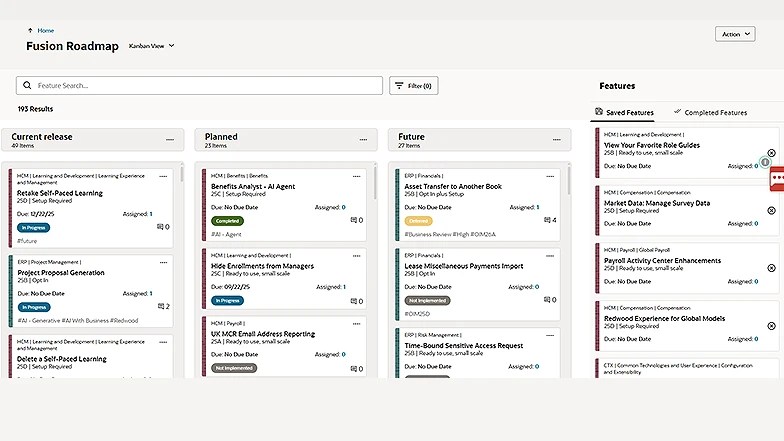
Not only was the knowledge sharing from the panel really inspiring, what I took away most from the session was how much I love the HCM Cloud community. During the Q&A at the end, a number of people asked for advice. One key question was around how to handle incorporating innovation when the organisation had only just gone live and were struggling to keep on top of BAU work. The panel were very reassuring and provided personal experiences,  but so did the audience. A number of people, myself included, stopped to speak to the question asker at the end to provide advice and reassurance. I highlighted the importance of Cloud Success Navigator as they could record the new features that are of interest on their roadmap, then review them in the future when they feel in a better place to start switching on additional functionality. The general conversation and support given made me very proud of the community.

I can’t believe this is the end of my AI World blogs. I hope you found them all interesting. I’d love to hear what you think. Thanks for joining me on this journey.

Please note all screenshots are the property of Oracle and are used according to their Copyright Guidelines